Pages

Showing posts with label MSI GTX 960 2G OC. Show all posts

Sunday, June 26, 2016

Testing the MSI GTX 960 2G OC with Heaven Benchmark 4.0

I have owned the MSI GTX 960 2G OC for quite some time now. Testing the MSI GTX 960 2G OC with Heaven Benchmark 4.0 would be a logical thing to do. I did not bother playing with the default settings it came with except for changing the pattern of the glowing MSI logo on the video card itself. I like to keep it in the "breathing" pattern. You can refer to a previous blog post by clicking on this link for details on the different LED light patterns available on this MSI GTX 960 2G OC card.

Downloading Heaven Benchmark 4.0

You can download the benchmark tool by going to the link below:

https://unigine.com/products/benchmarks/heaven/

It's a 247 MB file so the download could take up to a few minutes; at least for us in the Philippines who have relatively slow internet speeds. It took me about 10 minutes, I think, to download using my 5 Mbps connection.

Installing Heaven Benchmark 4.0

Installation is a breeze and all I had to do was accept all the default setting except for the install location. I have an SSD where I installed my OS but I have most of my applications installed on another physical drive.

My system

I do not have a "high-end" gaming computer but the card performs well on 1080p gaming. I really like this card and I would say it is a "bang for the buck" GPU.

Processor: Intel I5-2400 @ 3.1 Ghz
Ram: 2 x 4GB DDR3 1333
Resolution: 1920 x 1080
GPU: MSI GTX 960 2G OC
GPU Mode: Gaming mode (default)

Results

I got fairly good results with FPS ranging from 40+ to 100+. It usually is in the 60+ range throughout the test. I also got a maximum GPU temperature of 60 degrees.

These are the default settings when I first opened Heaven benchmark and I didn't change anything before running the test.


Here are some of the screenshots that I took while the test was running.


I would strongly recommend this card if you want a good-performing 1080p gaming GPU. You can check out the link below if you want to order a GTX 960 online.

http://ho.lazada.com.ph/SHGjUS

Sunday, June 5, 2016

Easy overclocking with the MSI GTX 960 2G

In a previous blog post, I upgraded my GPU to a MSI GTX 960 2G OC edition. You can view that blog post via this link.

This GPU comes factory overclocked. The reference base clock for this card is 1127 MHz with a boost clock of 1178 MHz. Out of the box, this MSI GTX 960 2G OC is clocked at 1190 MHz with a boost clock of 1253 MHz. The card also features the TWIN FROZR V. This feature allows the fans to turn off when they are not needed. On normal day to day use, I did not even notice the fans turn on at all. This means the card is dead silent.

The disc that came with the card comes with additional software aside from the device drivers. One of the software that came in the disc is the MSI Gaming App. Among other things, the card allows you to change the pattern of the MSI logo glow on the GPU itself from the default steady, to breathing, flashing, or double flashing. It also allows you to select which mode you want the card to be in. The default is the gaming mode which clocks the card at 1190 MHz with a boost clock of 1253 MHz. Other modes you have are the OC mode and the Silent Mode.

Here is the window where you can select the different MSI LOGO LED light mode. Unfortunately, there is no option to change the color of the light other than WHITE.


As for the different MSI Gaming App modes, here's a summery:
  • Gaming mode (default): Base clock 1190 MHz - Boost clock 1253 MHz
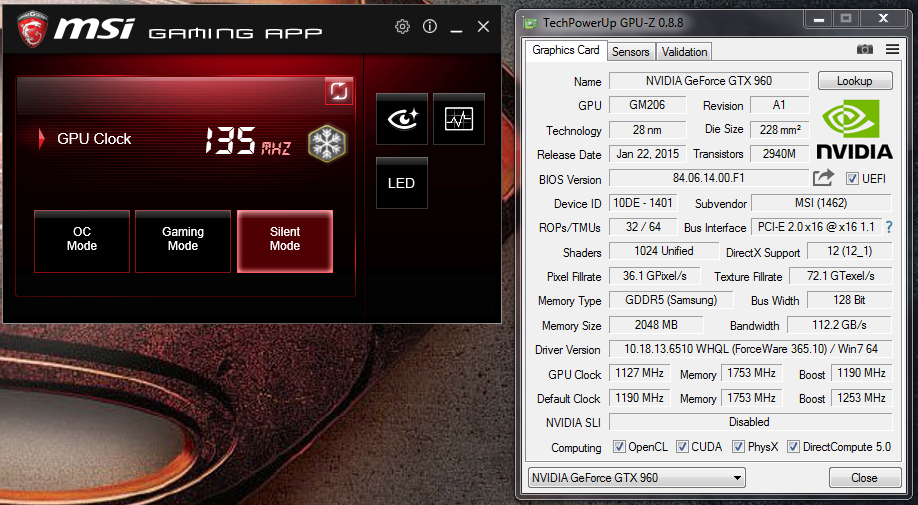
  • Silent mode: Base clock 1127 MHz - Boost clock 1190 MHz
  • OC mode: Base clock 1241 MHz - Boost clock 1304 MHz
While changing the mode, you can actually see the clock reading in GPU-Z change. Take a look at the images below:

Gaming mode

Silent mode

OC mode

Are you using the same GPU? What is your preferred MSI Gamin App mode?

If you want to get the GTX 960 delivered right into your doorstep, you can click this link.

Note: The item indicated in the link is the cheaper Zotac version. Still the same GTX 960 with 2GB of video RAM.